 ReadLevel AI
How to find a book's reading level without a barcode
Updated November 2026
Short answer: take a photo of one page. The ReadLevel AI app for iPhone reads the text on the page and estimates the book's age range, grade level, and a Lexile-style level in a few seconds. Because it reads the words instead of looking up a barcode, it works for library books, old books, photocopies, books with no ISBN, and books in other languages.
Why barcode lookups often fail
Most reading-level tools work by looking up a book's ISBN in a database of books that have already been leveled. That works well for popular new titles. It breaks down when:
- a library sticker or label covers the barcode
- the book is old, used, or printed before ISBNs were common
- the book is from a small press or self-published and was never leveled
- you have a photocopy, worksheet, or a single chapter rather than the whole book
- the book is in a language the database doesn't cover
In all of these cases you need to look at the text itself.
Four ways to check a reading level
1. Look on the book or the publisher's site
Many children's books print a level on the back cover or spine ("Level 2," "Ages 6–8," "Grade 3"). Publishers' websites often list them too. This is quickest when it's there, but levels vary between publishers and many books don't have one.
2. Search an online book-leveling database
If you know the title and author, you can search a leveling database or a school library catalog. This only works for books someone has already leveled.
3. Use a readability formula by hand
Formulas like Flesch-Kincaid estimate a grade level from average sentence length and syllables per word. You can type a passage into a free online readability checker. It works on any text, but you have to type the passage in, and the formulas ignore vocabulary difficulty and content.
4. Take a photo with ReadLevel AI
ReadLevel AI does the reading for you. It looks at vocabulary, sentence structure, and how complex the ideas are, then gives you levels you can act on right away. It works on any printed page, in English and many other languages.
Step by step with ReadLevel AI
- Choose a page. Open the book to a full page of ordinary text, ideally from the middle of the book.
- Scan it. Open ReadLevel AI, point the camera so the text fills the frame, and tap the scan button.
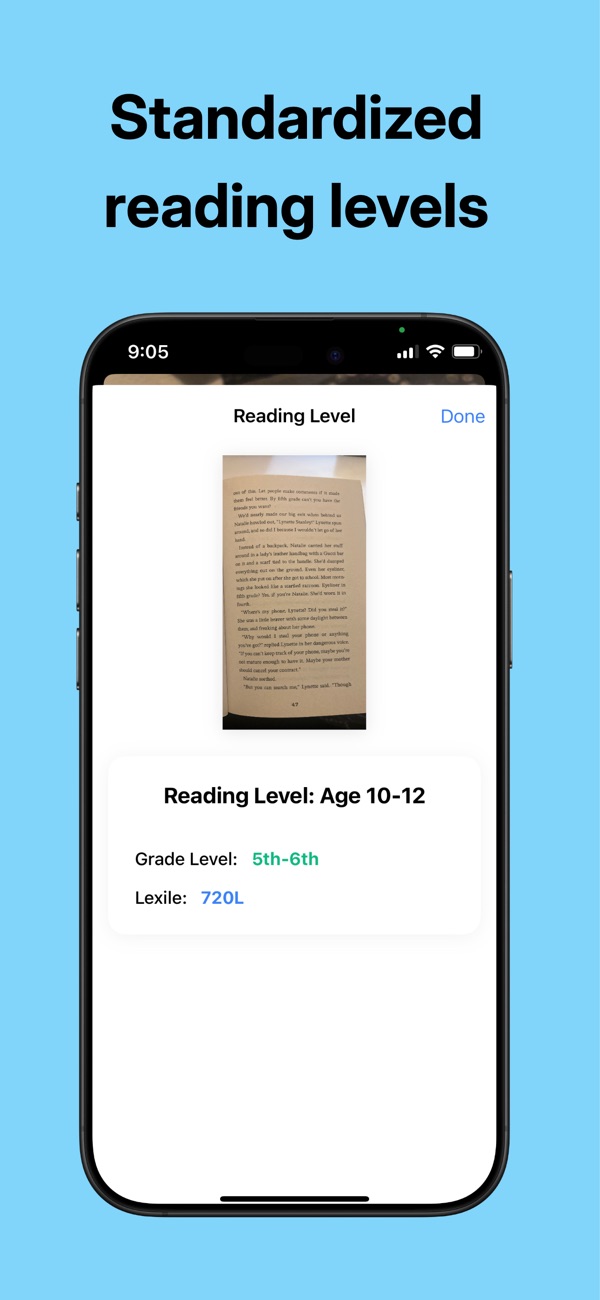
- Read the result. You'll see an age range, a grade level, and a Lexile-style estimate for English books, or a CEFR or HSK level for other languages.
- Check your history. Every scan is saved in the History tab so you can compare books later, which is handy when leveling a whole shelf.
Tips for an accurate result
- Skip the first few pages. Openings are often simpler or more descriptive than the rest of the book.
- Avoid pages that are mostly dialogue, pictures, or chapter titles.
- Use good light and hold the phone flat over the page so every line is readable.
- For a long or uneven book, scan two or three pages and use the middle result.
What the numbers mean
| Level | What it tells you | Example |
|---|---|---|
| Age range | Roughly how old a typical independent reader of this text is | Ages 8–10 |
| Grade level | The US school grade where students usually read text like this on their own | 3rd–4th grade |
| Lexile-style estimate | A number on a scale from below 200L (early readers) to above 1300L (advanced high school and adult) | 720L |
| CEFR | European scale for language learners, from A1 (beginner) to C2 (near-native) | B1 |
| HSK | Chinese proficiency scale for learners, from HSK 1 to HSK 6 and above | HSK 2 |
Every leveling system is an estimate. Interest, background knowledge, and motivation matter too, so a child may happily read above or below their "level."
Frequently asked questions
Can I find the reading level of a book that isn't in any database?
Yes. Database lookups only cover books that have already been leveled. Analyzing the text directly, by hand with a readability formula or with ReadLevel AI, works for any book.
Is the result an official Lexile measure?
No. Official Lexile measures are assigned by MetaMetrics. ReadLevel AI gives an estimate in a similar format so you can compare it with levels you already use.
Does it work for books in Spanish, Chinese, or other languages?
Yes. For books in other languages you get an age and grade estimate plus a learner level such as CEFR or HSK.
Can teachers use it to level a classroom library?
Yes. Scan one page per book and the History tab keeps a list of every book with its age and grade level, so you can sort books into bins afterwards.
Try it on the next book you pick up
ReadLevel AI is free to download for iPhone.